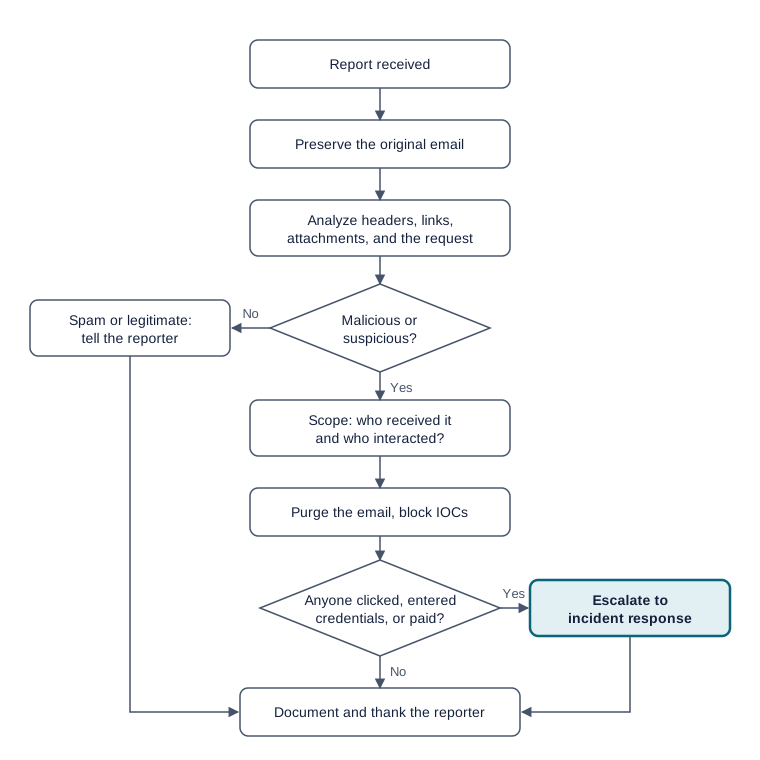
Step-by-step triage
Follow these ten steps for every reported email. Most reports take 10 to 20 minutes. Your goal is to answer three questions: Is it malicious? Who else got it? Did anyone act on it?
Before you start
- Access to your ticketing system and your email security console or mail-log search tool.
- An analysis environment: a sandbox, a virtual machine, or approved online tools (see Tools & References).
- Your team's escalation contacts and playbook.
Safety warning
Never click links, open attachments, or reply to a reported email on your normal work computer. Never forward a suspicious email to coworkers. Use only approved analysis tools.
Escalate immediately if
anyone entered credentials, opened an attachment, or sent money, or if the email targeted executives or finance staff. Credential exposure usually requires a password reset and ending that user's active sessions.
- Document and close.
Record your findings, the IOCs (defanged), the actions taken, and the time spent. Reply to the reporter and thank them, even if the email was harmless.
Ticket note template
Copy this into your ticket and fill in each line.
Summary: [Malicious / Suspicious / Spam / Legitimate / Simulation]
Reporter / time:
Sender (display name | address | Reply-To):
Authentication: SPF __ | DKIM __ | DMARC __  (for domain: ______)
IOCs (defanged):
Recipients affected: __ | Interactions (clicks / credentials): __
Actions taken:
Escalated to / time: